Figma is not working in Russia: blocking or a widespread outage — what happened and how to access it
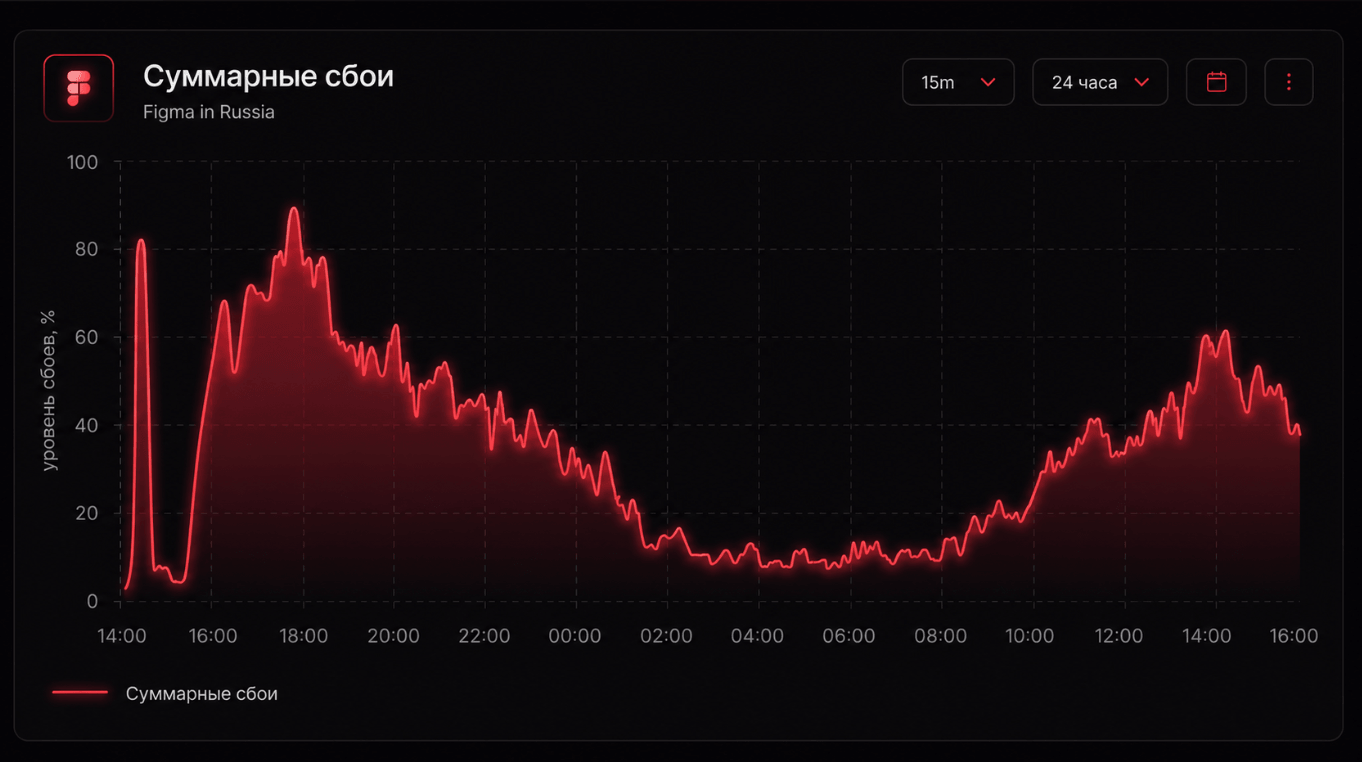
The service Figma — one of the key tools for web designers, interface designers, and product teams — has been unavailable to users in Russia for about a day. According to reports, problems are seen in both the browser version and the desktop app: the site does not load, synchronization does not work, and the app shows a connection error. At the same time, the official status.figma.com says that all systems are operating normally.
What is happening with Figma
Since yesterday evening, figma.com has stopped opening for Russian users — the connection either drops during the TLS handshake or requests hang while waiting for a response. Users who already had Figma open in the browser stopped receiving updates from other file participants; when trying to sign in, the desktop app shows “Connection error” and does not load the list of recent projects.
The pattern is typical of blocking at the TLS/SNI or IP level, not of an outage on the service side: requests reach the network, but no response comes back. We have covered in detail how DPI, SNI, DNS, and IP blocking differ — here the pattern most closely resembles SNI filtering through TSPU, where the provider “drops” the connection as soon as it sees the name figma.com in the SNI field.
What the checks showed
- Freedom Checker’s internal check across all Russian operators we poll (MTS, MegaFon, Beeline, Tele2, Rostelecom) showed that connecting to figma.com from Russia without a VPN is currently impossible — the connection drops in the same way for everyone. Through a VPN, the service opens without problems, which confirms that the problem is not with Figma, but with the route to it from Russian networks.
- Downdetector recorded more than 2,200 complaints over several hours, and the number continues to grow. Most reports are coming from Moscow, St. Petersburg, and Ufa — but the geography is expanding.
Neither Figma nor Roskomnadzor has publicly commented on the situation.
Is this blocking or an outage?
There is no definitive answer yet. The case for blocking is supported by the fact that: (1) Figma’s official status is green — globally, the service is working; (2) traffic to figma.com drops in the same way across different operators in the Russian Federation, which is characteristic of centralized filtering via TSPU; (3) everything opens without problems through a VPN.
The case for the “technical outage or scheduled maintenance” version is the absence of an official comment from RKN and the fact that Figma has not appeared in the blocking registry. An intermediate scenario is also possible: targeted SNI blocking without a public entry in the registry — this has happened before, for example when access to a number of American cloud services was restricted.
It is worth recalling that back in 2022 Figma froze corporate sales in Russia — Russian companies lost the ability to pay for paid plans. However, free access to personal accounts had remained available until recently.
What to do right now
- Turn on a VPN. Right now this is the fastest way to continue working with Figma. To choose a service that actually works on your operator today, it is convenient to use Freedom Checker — it shows the live status of all tested VPNs on MTS, MegaFon, Beeline, Tele2, and Rostelecom. A ready-made selection with reviews is in our VPN for Russia section; step-by-step selection logic is in the article “Which VPN works in Russia right now”.
- Try mobile internet. Sometimes mobile networks filter SNI more softly than home providers — this is not a rule, but it is worth checking.
- Change DNS to 1.1.1.1 or Quad9 — in most cases this will not help if this is SNI blocking, but it will definitely rule out the DNS scenario.
- Check whether it is only you, not everyone. If Figma has “dropped” specifically for you, but opens for a neighbor on the same operator, the problem is local: DNS cache, a provider filter, or a corporate proxy. The simplest test is to open figma.com over mobile internet or from another network.
What can replace Figma in case of a long block
If the situation drags on, Figma has usable alternatives:
- Penpot — an open-source Figma analogue, available as a self-hosted or cloud version. It opens from Russia without a VPN. It supports collaboration, components, prototypes; import of
.figfiles from Figma is already available. - Lunacy — a free desktop editor from the Russian Icons8 team (Windows/macOS/Linux), reads
.sketchand partially.fig. Works offline. - Sketch — the classic option for macOS; the desktop app works without internet, with synchronization through iCloud or its own clouds.
- Adobe XD — Adobe also currently has its own access difficulties from the Russian Federation, and the product is effectively in maintenance mode, but it works as a prototype viewer.
It will not be possible to move an entire team to another tool in one day, but it is worth having a backup workflow in case of a long block now.
What happens next
If the blocking is confirmed, it will fit into a series of similar restrictions on foreign cloud services over the past two years. If this is a technical outage, Figma will restore access within a day. If the situation drags on, Freedom Checker will immediately show which VPN services currently open access on your operator — useful so you do not lose working time trying services manually.